Professional UGC prompts
Follow @avelineroseugc on InstagramFollow for AI influencer branding, moodboards & creator prompts ✨FollowBuild Your AI Influencer Brand Board — One Prompt, One Page
@Avelineroseugc shares her premium fill-in-the-blanks prompt to generate a one-page AI Influencer Personal Branding Sheet — identity-locked, editorial, and ready for consistent content.
Most AI creators post beautiful images — but without a brand board, every post feels like a guess. I build personal branding sheets: one premium page that captures who your AI influencer is, how they look, and the rules that keep every future post on-brand.
Why a one-page branding sheet?
Think of it as a moodboard meets brand guidelines — but designed for AI. One reference photo locks your avatar's identity. One layout shows your colors, textures, keywords, signature props, and DO/DON'T rules. When you (or your audience) create new content, you don't start from zero — you start from a sheet that already knows your world.
- Identity stays consistent across every generation
- Colors, textures and keywords are visible at a glance
- DO / DON'T rules stop off-brand drift before it happens
- Shareable with collaborators, brands or your community
What's on the sheet?
The layout is clean editorial design — 3-column grid, thin dividers, minimal typography. Here's everything that goes on one page:
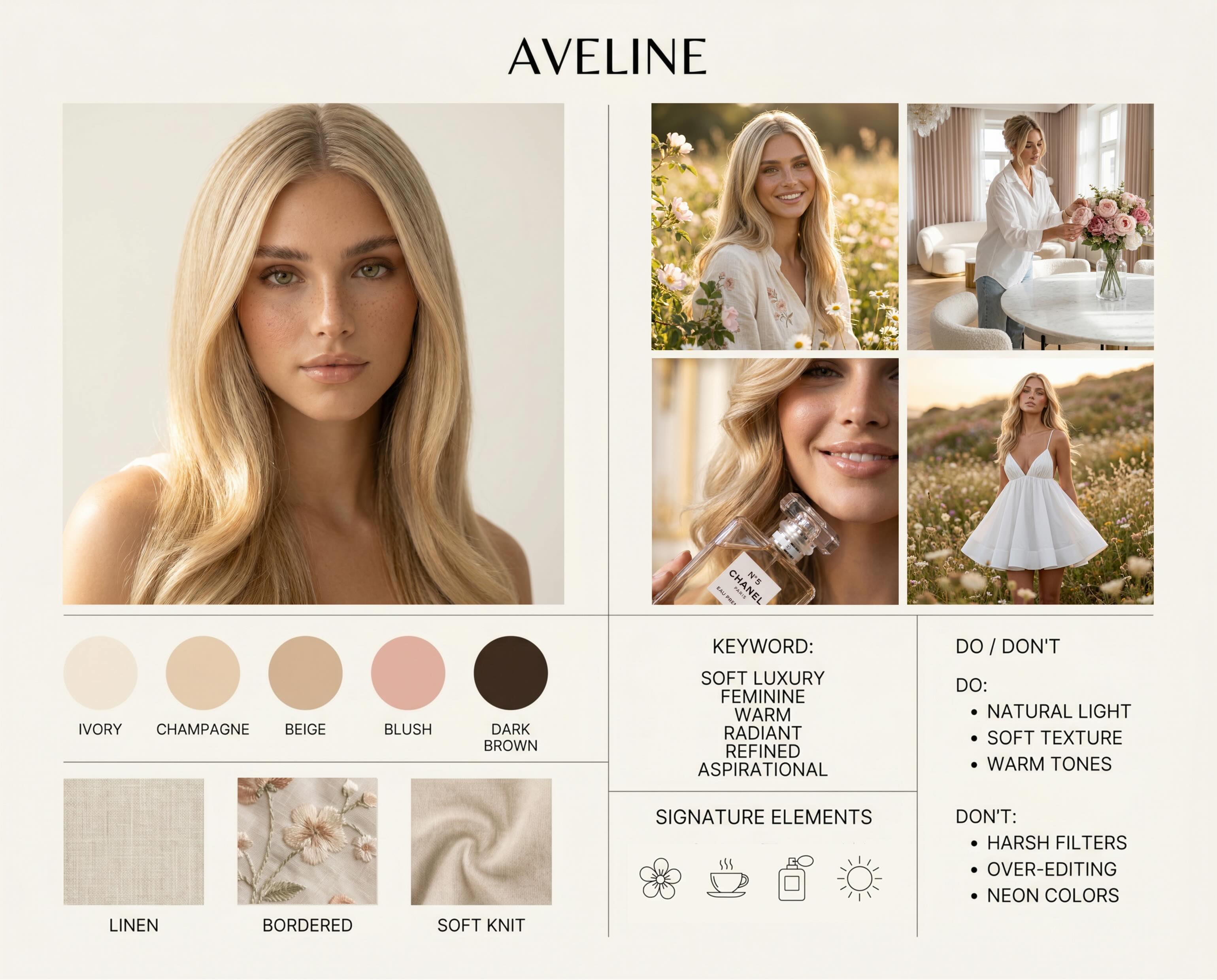
- Hero portrait (close-up) + 3 supporting lifestyle / product / cinematic frames
- 5 color palette swatches
- 3 material / texture tiles (linen, denim, chrome, latex, etc.)
- 5 brand keywords
- 2 signature elements (recurring props, motifs or environments)
- DO / DON'T brand rules
- Visual style, lighting & camera feel — one line each
Sample brand sheet by @Avelineroseugc
Here's a real example — the AVELINE personal branding sheet built with this exact prompt structure: hero portrait, lifestyle frames, color swatches, textures, keywords, signature elements and DO/DON'T rules in one clean editorial layout.
Build your prompt — pick your brand
Tap the options below to build your own branding sheet prompt — pick your palette, keywords, DO/DON'T rules and more. Copy the live preview and paste it into VAKPixel with your reference photo uploaded.
AI Influencer Personal Branding Sheet
Select your brand options — your custom prompt updates instantly.
Pick 5 swatches for your brand board
Pick 3 textures
Pick 5 brand keywords
Pick 2 recurring props, motifs or environments
Create a premium one-page "AI Influencer Personal Branding Sheet" for My Avatar.

IDENTITY PRESERVATION: use the uploaded reference image as a strict identity lock. Preserve exact facial identity, hairline, eye shape, skin tone, and overall likeness. Do not change age, ethnicity, or key facial features. Use ONLY this one reference image and do not swap references across generations.

GOAL: visualize the avatar's unique personal brand (style, story, persona) with clear creative guidelines that keep future content consistent.

LAYOUT: clean editorial design, background color: #FFFFF0, 3-column grid, thin dividers, readable minimal typography.
Include:
1) hero portrait (close-up),
2) 3 supporting images (choose from: lifestyle / outdoor / product interaction / texture detail / cinematic frame),
3) color palette swatches: #FFFFF0, #F7E7CE, #F5F0E6, #FFB6C1, #4A3728,

4) material/texture tiles: LINEN, SOFT KNIT, EMBROIDERED FABRIC (example: linen, embroidered fabric, denim, latex, chrome, etc),
5) keywords block: SOFT LUXURY, FEMININE, WARM, RADIANT, REFINED,
6) signature elements: GOLD ACCENTS, FLORAL MOTIFS (recurring props / motifs / environments),
7) DO / DON'T bullets (brand rules):
DO: NATURAL LIGHT, SOFT TEXTURE, WARM TONES
DON'T: HARSH FILTERS, OVER-EDITING, NEON COLORS

VISUAL STYLE: soft luxury warm natural (e.g., "soft luxury warm natural" OR "bold neon cyber editorial").
LIGHTING: natural light (e.g., golden hour, studio flash, hard contrast, colored gels).
CAMERA: 85mm f/2 soft bokeh (e.g., 85mm f/2 soft bokeh, or 35mm gritty street, etc).

TEXT RULE: keep text minimal and legible, only headings and labels, no long paragraphs.

AVOID ONLY TECHNICAL FAILS: plastic skin, AI-smoothed face, incorrect anatomy (extra fingers), deformed eyes, inconsistent identity across the 4 images, unreadable or distorted typography, cluttered layout, broken grid alignment.
Tip: Upload your avatar's reference photo on VAKPixel first, then paste your generated prompt. One reference image = strict identity lock across all 4 images on the sheet.
How I use it
I generate the sheet once, save it, and refer back before every new content batch. When I want a lifestyle post, a product shot, or a cinematic frame — the sheet already tells me the colors, textures, lighting and camera feel. It's the difference between random pretty images and a brand people recognize.
Your AI influencer isn't just a face — it's a world. The branding sheet is the map.
See my work, prompt packs & branding creations ✨
Upload your reference image and paste the prompt
Loved @Avelineroseugc's tips? Share the love 💕
Want to grow with creators like @Avelineroseugc?
Build your portfolio, publish Prompt Packs, and connect with a community of AI creators on VAKPixel.