Why This Pre-Processing Works
Face-safety filters rely on detecting a clean, high-confidence set of biometric landmarks. The model-sheet prompt deliberately introduces two overlays that interfere with that detection while preserving the character's identity for the human eye:
Wireframe Mesh Overlay
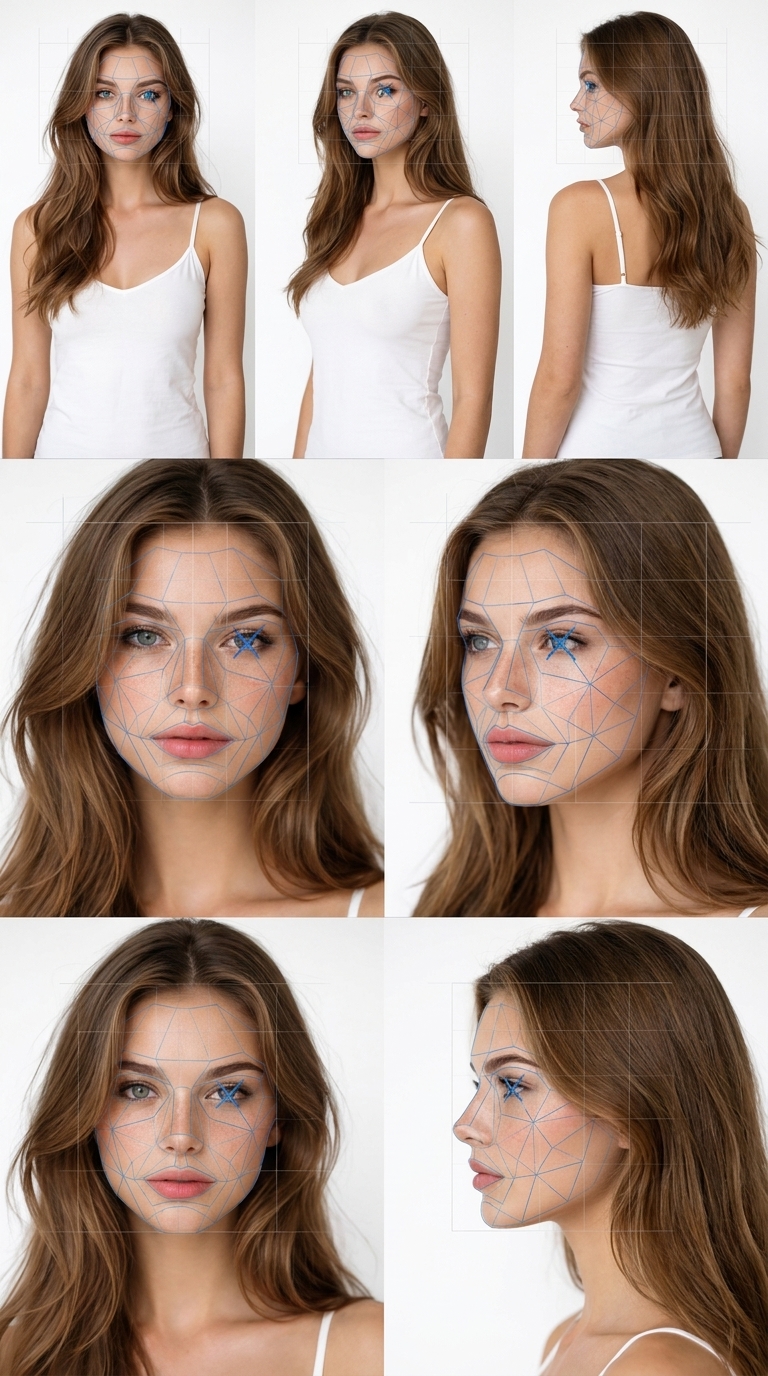
A translucent blue geometric mesh follows the contours of the cheeks and forehead, with a cross mark over one eye. It keeps the eyes and mouth readable while disrupting precise facial geometry.
6×6 Grid Overlay
A subtle, very thin semi-transparent 6×6 white grid is aligned over each face. This consistent overlay further breaks the biometric landmark pattern across every panel.
What the Model Sheet Contains
The prompt produces a 6-panel reference sheet of the same character: a top row with full-body front, three-quarter, and side/rear views, and a bottom row with face close-ups (front, three-quarter, and side profile). Keeping the face, hair, outfit, proportions, colours and materials identical across panels gives Seedance a strong, consistent identity to work from once the reference is accepted.
Tips for the Best Results
- Start from a clear, well-lit photo where the face is unobstructed.
- Use a neutral expression and a plain background for cleaner panels.
- Keep the wireframe and grid overlays — removing them reduces the acceptance rate.
- If a reference is still rejected, regenerate the model sheet; small variations can change the outcome.
With a pre-processed image like the example above, there is a much better chance Seedance 2.0 will accept the human face in your reference and let you generate your image-to-video clip.